Inbox screen
System messages: reports and notices lazy files for you (Inbox at the right of the navigation bar, address /messages). The badge counts unread messages. For what a message is and who posts one, see System messages.
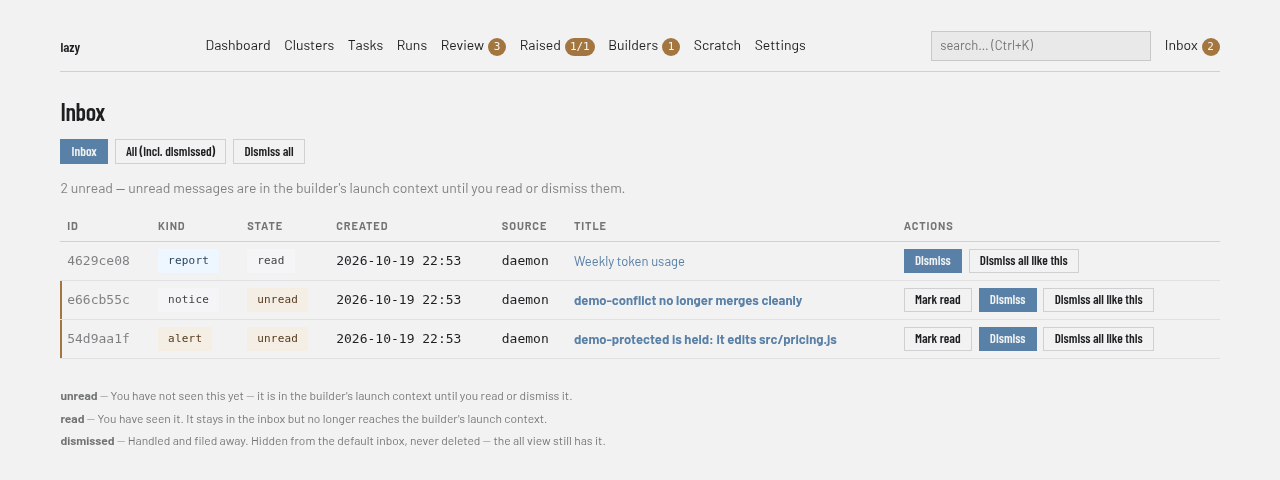
Regions
- Filter buttons. Inbox (the default) hides dismissed messages; All (incl. dismissed) shows everything. In the inbox view, Dismiss all dismisses every open message after a confirmation.
- Summary line. How many messages are unread. Unread messages are part of the builder's launch context until you read or dismiss them.
- Table. One row per message, newest first, with ID, Kind (hover for its meaning), State, Created, Source, Title and Actions. A message that repeated shows "happened N times" beside its title.
- Actions. Mark read (unread messages only), Dismiss, and Dismiss all like this, which dismisses every open message with the same source and title after a confirmation. A dismissed message shows when it was dismissed and by whom; dismissed messages are kept, never deleted.
- Legend. Under the table, the meaning of the three states: unread, read and dismissed.
A title opens the message, with its metadata, the same actions, and its full text.
The dashboard home also lists unread messages; see Dashboard screen.