Settings screen
Project memory, services and installation health (Settings in the navigation bar, address /settings). Three tabs sit under the heading: Memories, Services and Doctor. The page opens on Memories.
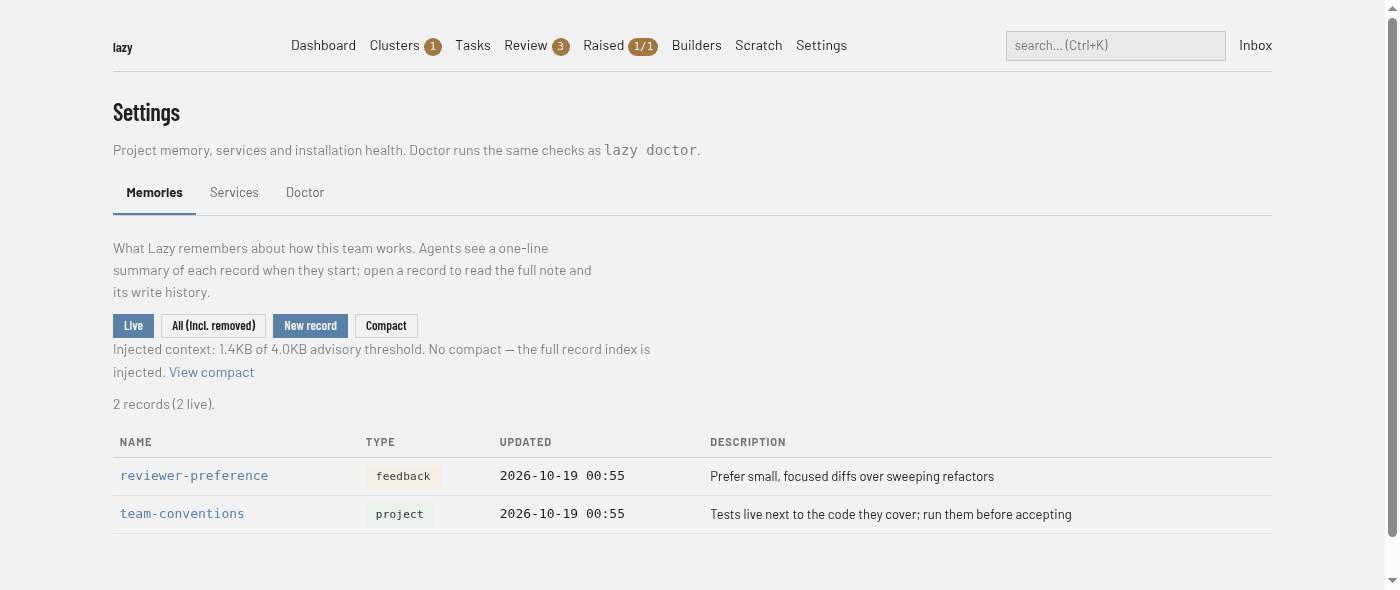
Memories
/settings/memory. The shared memory records Lazy injects into builder and agent launches. For what a record is, how compaction works and who may write, see Shared memory.
- Live and All (incl. removed) switch between current records and every record including removed ones (their history is kept).
- New record opens a form with Name, Type, Description and Body. Compact opens the compact page, where you can run or clear compaction.
- A line reports how much context the index injects against the advisory threshold.
- The table lists each record's Name (opens it), Type, Updated and Description. A record's page shows its body, its write history, an edit form, and a link to remove it.
Services
/settings/services. The project-wide Start services command: the one command a task's Start services runs inside that task's environment, with the ports declared under [serve] published. It is the same for every task. The tab shows the current command, a box to change it and a Clear command button; with none set, no task offers Start services. The command is saved to the project's store, not to lazy.toml. See Reaching a task's dev server.
For example, declare a web service in the project root's lazy.toml:
[serve.services]
web = 3000
Then set the Start services command on this tab to launch the app on port 3000. In Lazy Teams, a project admin edits the same port under Settings → Configuration.
Doctor
/settings/doctor. The same checks as lazy doctor.
- Run doctor runs the checks and shows the result; until you run it, the tab shows the last report, or says doctor has not run yet.
- Report. The time of the last run and a count of errors and warnings, then one card per check with its status, detail and, where there is one, a documentation link and a button to run its remedy. A Missing runs list, when there is one, names tasks with an explanation for each.
- Remedies. A list of the cleanup actions
lazy doctoroffers as flags, each with its command. Actions that remove disk, containers or stored content open as a Preview that lists what would go and asks again before running; the others have a Run button.