Raised items screen
Every question, decision and proposal that agents have raised, across all tasks (Raised in the navigation bar, address /raised). The badge on the navigation entry shows open blocking items first, then non-blocking ones (for example 1/1). For what raised items are and how they gate a merge, see Raised items.
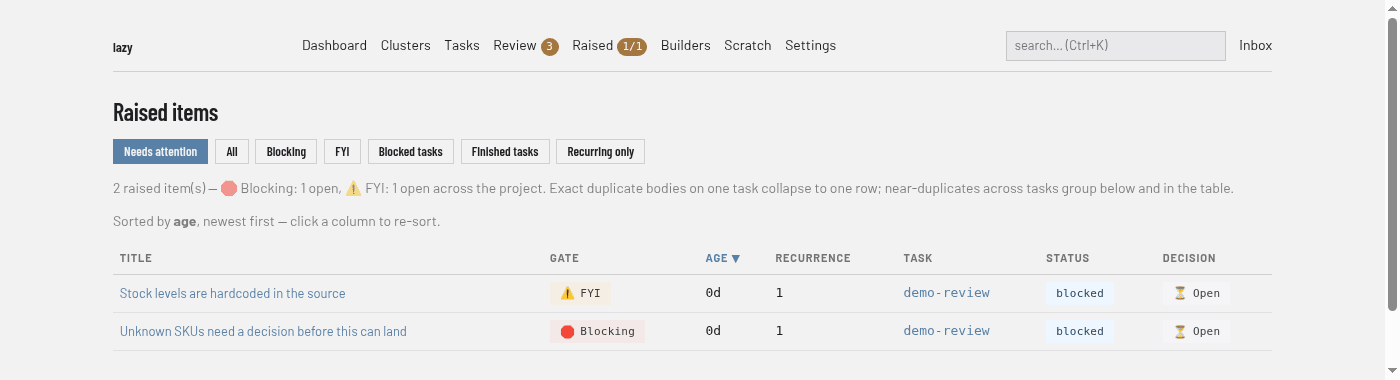
Regions
- Filter buttons. Needs attention (the default) lists open items on blocked tasks. All lists every item, decided ones included. Blocking and FYI list only items of that gate. Blocked tasks and Finished tasks restrict the list by the status of the task the item sits on. Recurring only lists items that near-duplicate others, most recurrent first.
- Summary lines. The count of items, with how many are open per gate, and the current sort order. Exact duplicates on one task collapse into one row; near-duplicates across tasks are grouped.
- Table. One row per item with Title (opens the item), Gate (Blocking or FYI), Age, Recurrence, Task (a link to the task page), Status (of that task) and Decision (open, or how it was decided). Click a heading to sort.
- Recurring items. When near-duplicates exist, a section below the table groups them with their count, a sample and the tasks involved.
An item
A title in the table opens the item, which shows:
- its gate, decision, task, date and recurrence size, then the item's text;
- Options the agent offered and Agent comments, when there are any;
- Decide, for an open item: choose Respond to agent, Acknowledge, Promote to subtask, Promote to peer task or Dismiss, add a response, and apply. Promoting creates a backlog task that is never started automatically, with a goal and code you can edit, records the item as promoted, and opens the new task;
- Gate, which lets you flip the item between blocking and FYI. The agent chose the flag, and you have the last word;
- Provenance, and Similar raised items.
Items for a single task are also listed on that task's Raised tab.