Task page
The page for one task, at /tasks/<code> (the task's code, or its id when the code is shared with another task). Open it from any task link: the task list, the review queue, search results.
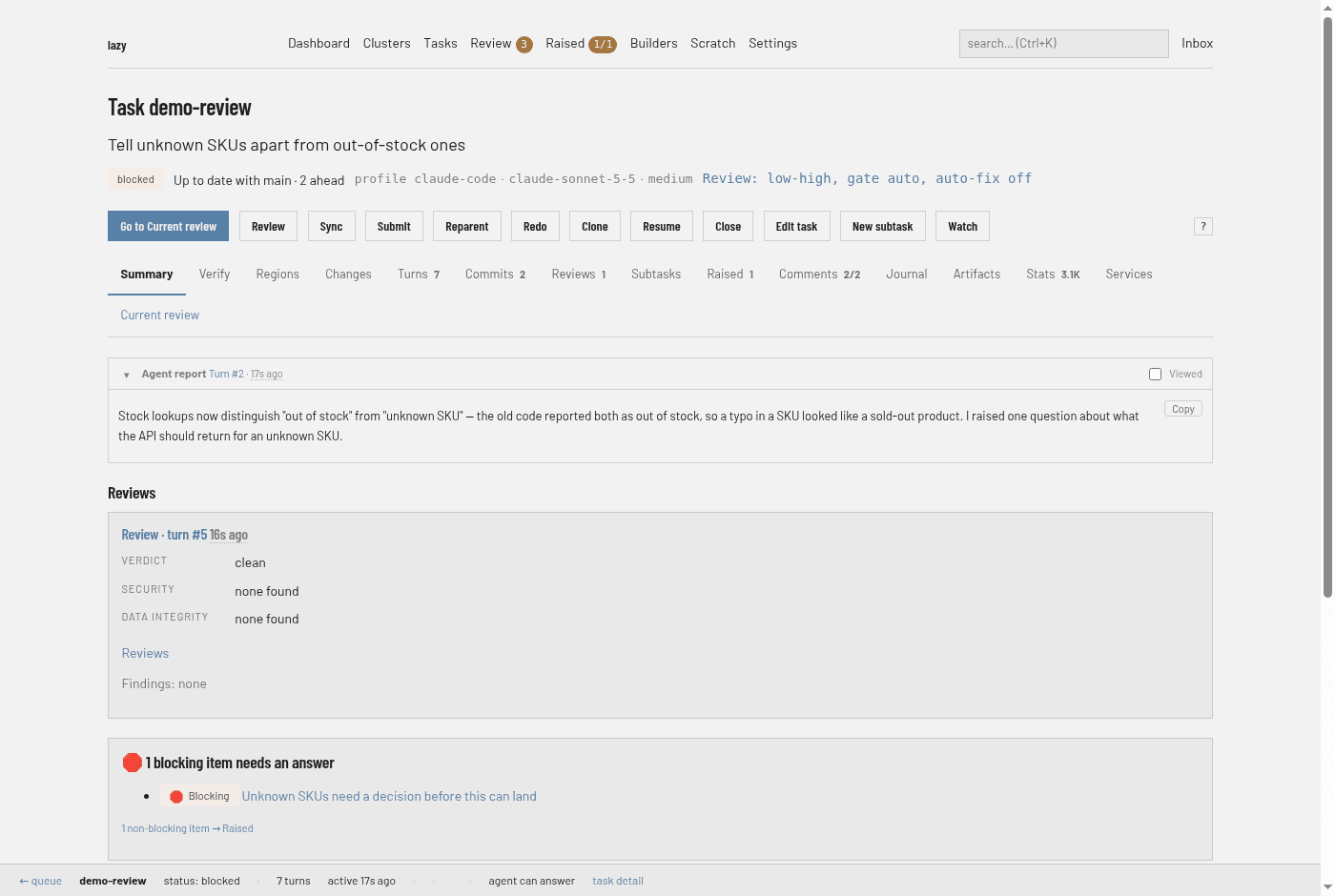
Header
- Title and goal.
Task <code>and the task's goal. - Status line. The status badge, then, when they apply: a link to the parent task, a marker for a linked branch, a link to the pull or merge request, how the task stands against its parent branch (for example
Up to date with main · 2 ahead, as of the last fetch), the agent profile, model and effort the next turn will use, and the task's review setting (for exampleReview: low-high, gate auto, auto-fix off). Hover an item for where its value came from. Tags appear on their own line. - Action buttons. Which buttons appear depends on the task's status. A button that does not apply right now is shown greyed out, and its tooltip says why.
| Button | When | What it does |
|---|---|---|
| Go to Current review | Blocked or conflict tasks | Opens the Current review tab, where you accept, unblock or ask. |
| Start | Backlog tasks | Starts the agent's first turn. |
| Resume | Interrupted or blocked tasks with a session | Resumes the agent with no new feedback. |
| Stop | While a turn is running | Halts the agent; asks for a reason. The task does not resume by itself. |
| Review | Blocked, conflict, submitted or interrupted tasks | Runs a read-only agent review of the task's work and records it on the task as a review, with a verdict and security and data-integrity results. You land on the Reviews tab. The task keeps its status. Tick Automatically fix to have lazy start a work turn that hands the review's findings to the agent as fix feedback when the review finds issues. Lazy posts nothing to a pull or merge request. |
| Sync | Blocked, conflict or interrupted tasks | Merges the parent branch into the task; the agent resolves conflicts. |
| Submit | Blocked or conflict tasks that have commits | Pushes the task branch, creates or updates the pull or merge request and marks the task submitted. Needs a remote driver in lazy.toml. |
| Reparent | Tasks that are not finished or running | Points the task at another parent (a task or a branch) and merges that parent into the task's branch, with the agent resolving conflicts. |
| Redo | Tasks that are not running, complete or closed | Asks for a reason, closes the task and creates a replacement under the same parent, then opens the replacement. |
| Clone | Tasks that are not running | Creates a new task from this one without starting it, then opens it; you can change its goal, prompt, code, model and agent first, or base it on the exact commit this task started from. |
| Close | Tasks that are not finished | Closes without merging; asks for a reason. |
| Reopen | Completed or closed tasks | Brings the task back: to blocked if it had a session, otherwise to the backlog. A completed task needs a reason. |
| Edit task | Tasks that are not finished | Edits the goal and prompt. |
| New subtask | Tasks that are not finished | Opens the New task form with this task as parent. |
| Watch | Tasks that are not finished | Opens a live, read-only view of the agent's output. |
| ? | Always (with scripting on) | Lists the keyboard shortcuts. |
Reject and Accept are on the Current review tab, not in this row.
Tabs
The tab strip is the same on every task; each tab is its own address (/tasks/<code>/<tab>). Some tabs carry a badge with a count. With scripting on, switching tabs swaps the body in place; with it off, each tab is an ordinary page. Keys 1–9 jump between the first tabs, and [ and ] step through them.
| Tab | Shows |
|---|---|
| Summary | Depends on status. A running task shows the agent's latest progress line and its latest turn. A blocked or conflict task shows the agent's report, review findings, blocking raised items awaiting an answer, and what changed since you last looked. A finished task shows its outcome. A backlog task shows its prompt. A collapsed Metadata section holds the id, timestamps and session details. |
| Verify | Steps for checking the work, from the agent's latest turn. |
| Regions | The units the change is split into for review. See Review regions. |
| Changes | The diff. |
| Turns | The record of turns, newest first. |
| Commits | Every commit on the task. |
| Reviews | Agent reviews that produced a usable result. |
| Subtasks | The task's child tasks. |
| Raised | Raised items on this task. See Raised items. |
| Comments | Comments on the task, including those not yet delivered to the agent. |
| Journal | The task's out-of-prompt notes. |
| Artifacts | Files attached to the task. See Artifacts. |
| Stats | Where the task's time and tokens went. |
| Shell | Terminals in the task's container. Hidden when the runner has no container. See Web shell. |
| Services | Declared ports and whether they are live. See Reaching a task's dev server. |
| Current review | Your in-progress review: queued comments and the buttons that end it. |
The full behaviour of each tab is described in Reviewing in the browser.
Status bar
A bar pinned to the bottom of the window shows a link back to the review queue, the task code, its status, the number of turns and how long ago the agent was last active, and a link to the task page. Counters for comments queued for the agent and review questions awaiting it appear once you have queued or asked something.