Tasks screen
The list of the project's tasks (Tasks in the navigation bar, address /tasks), with the forms that create a task or link an existing branch.
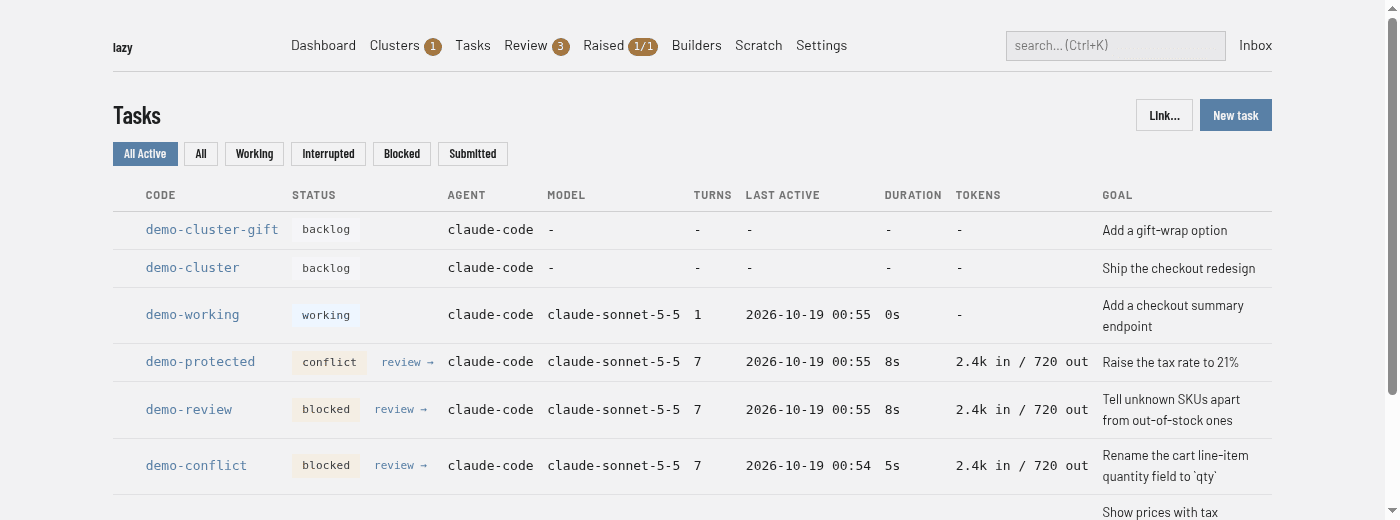
Regions
- Filter buttons. All Active (the default) lists every task that is not finished. All lists every task. Working, Interrupted, Blocked and Submitted list tasks in that status; Submitted also includes tasks that have a pull or merge request recorded.
- Link… and New task (top right). Open the two forms described below.
- Task table. One row per task. The unlabelled first column shows a link to the task's pull or merge request when it has one. The other columns are Code, Status, Agent, Model, Turns, Last Active, Duration, Tokens (in and out) and Goal. Click a column heading to sort by it; click again to reverse.
- review →. Beside the status of a blocked, conflict or submitted task. Opens the task page.
- Markers in the Goal column. Protected tasks and linked tasks carry a marker before the goal; when any protected task is listed, a legend under the table explains the markers.
A search from the box in the navigation bar is covered on the Search page.
New task
New task opens a form with the same fields as lazy create:
| Field | What it is |
|---|---|
| Goal | Required. A one-line statement of what the task is for. |
| Prompt | The instructions for the agent, written in Markdown, with a rendered preview above the box. |
| Code | The task's short name: lowercase letters, digits and hyphens, 2–63 characters. Left blank, one is derived from the goal. |
| Parent | A task code or id, which makes this a subtask, or a branch name, which makes a top-level task that targets that branch. Blank means the repository's default branch. |
| Type | The task type. |
| Agent profile, Model, Effort | Which agent runs the task. Leave them on the project default unless you want something different. |
| Review, Review gate, Review auto-fix | How the task is reviewed once the agent declares its work finished. Each can inherit from the parent. |
| Start now | Starts the first agent turn after creating the task. A prompt is required for this; unchecked, the task waits in the backlog. |
Link a branch or PR
Link… adopts work that already exists. Enter a pull or merge request URL, a branch page, origin/<branch> or a plain branch name; optionally a Parent and a Code. The new task is created on that branch as a blocked, linked task. See Linking a task.